
Credit By Exam Form
Last edit date:
Purpose: Students can submit a request to earn credits for a course through Credit by Exam. The student fills out the necessary portion of the form and submits it for approval. Before completing this form, make sure to discuss this option with your advisor and instructor who will oversee and evaluate your work.
| Contents |
|---|
| Accessing the Form |
| Completing and Submitting Form |
ACCESSING THE FORM
- Log in to RamPortal.
- Navigate to the Student Links Card and find the link for the Credit By Exam Form (see Fig 1).
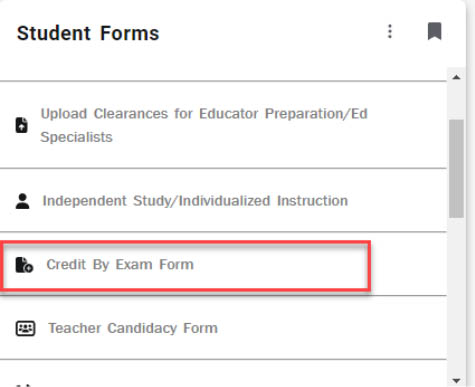
Fig 1
COMPLETE AND SUBMITTING FORM
- Read the instructions carefully and be clear on the description of your request, attaching any documentation that will help the department decide if your request is valid.
- The boxes with the red asterisk * are required fields. The RamNet ID, First Name,
Last Name, and Email are populated automatically using your login information. If
not, please close the form and try accessing it again (see Fig 2).
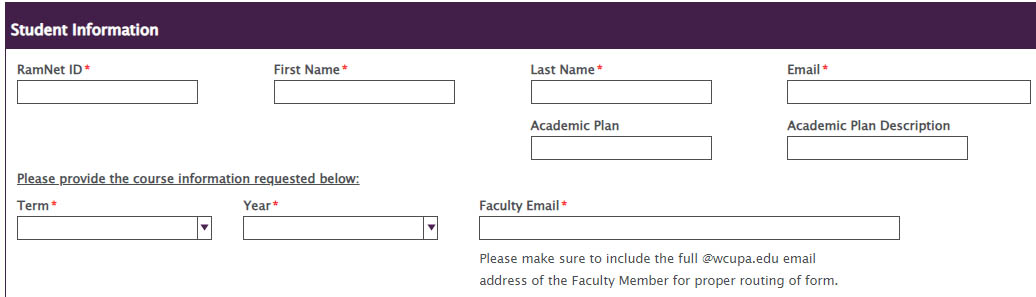
Fig 2 - Please indicate the course information in the questions provided. The Faculty Email is used for routing the form to the appropriate Faculty Member. This email must be complete and correct, or your request will not be processed. If you are unsure of the correct address please ask your Faculty Member (see Fig 2).
- Attach documentation that will help clearly define and support your request by selecting
Attach Document in the Supplemental Information section (see fig 3).
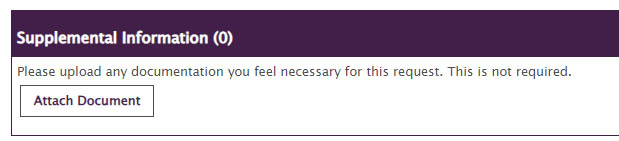
Fig 3 - Click the Submit button.
- You will receive an email confirmation in your WCU email account once the form has been processed.
For support, please submit an AES Support Portal ticket.