

Grades: View Final Grades in RamPortal
Purpose: This guide provides instructions for students to view their final grades in RamPortal.
| Contents |
|---|
| Navigation |
| View Final Grades |
NAVIGATION
- Log in to RamPortal using your WCU Single Sign On (SSO).
- Locate and select the Final Grades card on your home page.

Fig 1
VIEW FINAL GRADES
- On the View Grades page, Select a Term from the dropdown menu. See Fig 2.
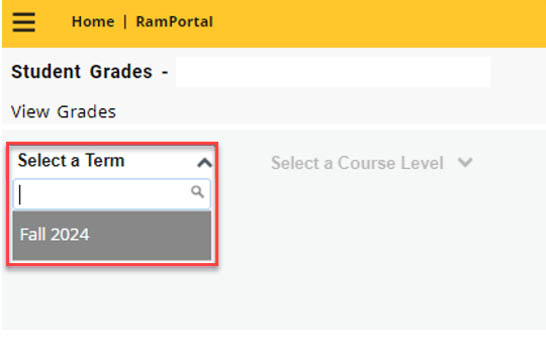
Fig 2- Note: If no term appears, final grades have not been finalized by the Registrar’s Office yet.
- Select a Course Level (i.e. Undergraduate or Graduate)
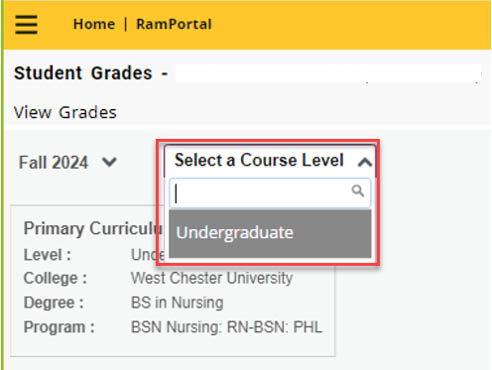
Fig 3 - Review your final grades on the Student Grades page. See Fig 4. The page also includes
your GPA Summary, Primary Curriculum information.
- GPA Summary definitions:
- Selected Term: GPA of the selected term
- Institutional: overall WCU GPA
- Transfer: transfer GPA
- Overall: combined Institutional and Transfer GPA
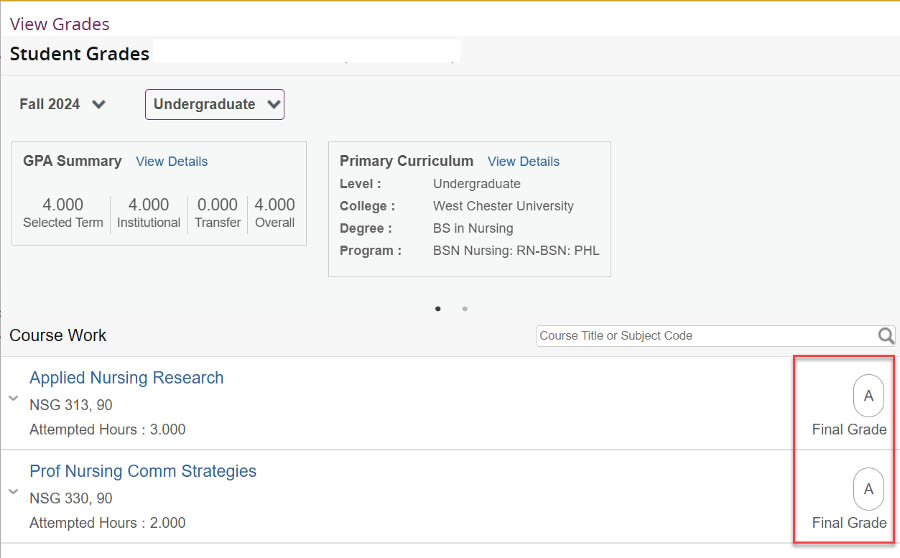
Fig 4 - GPA Summary definitions:
For support, please submit an AES Support Portal ticket.