

Legal Name Change Request
Purpose: A student may change their name to match their ID/SSN card because of a data entry error or a change is necessary after a marriage or divorce. In either case, the form must be filled out completely, and supporting documentation must be submitted.
- Log into RamPortal – ramportal.wcupa.edu
- Locate the Student Forms card.
- Click on the Name Change Request Form link (Fig 1).
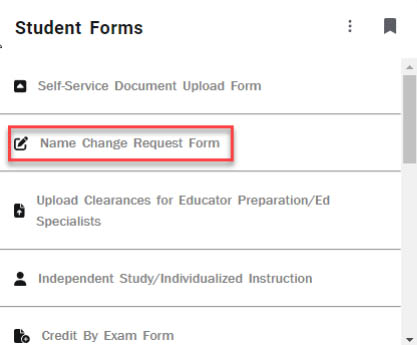
Fig 1. - The form will load and for active students, the shaded portions of the form will be
filled in with your information. Please fill in all of the non-shaded portions with
the changes to the legal name including portions that are unchanged (Fig 2).
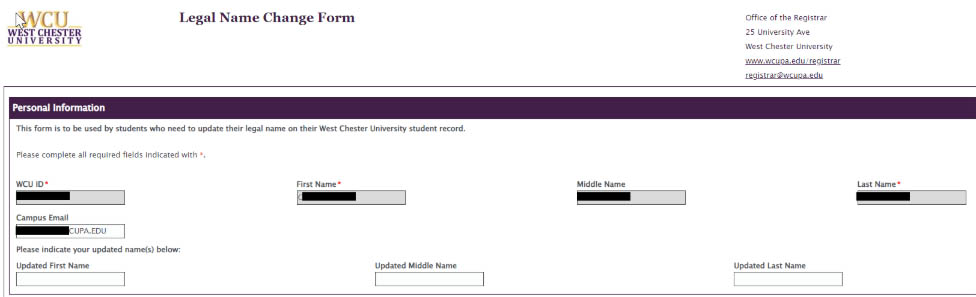
Fig 2. - To upload the supporting document for the legal name change, click the “Browse” button
to search for the document. (Fig 3).
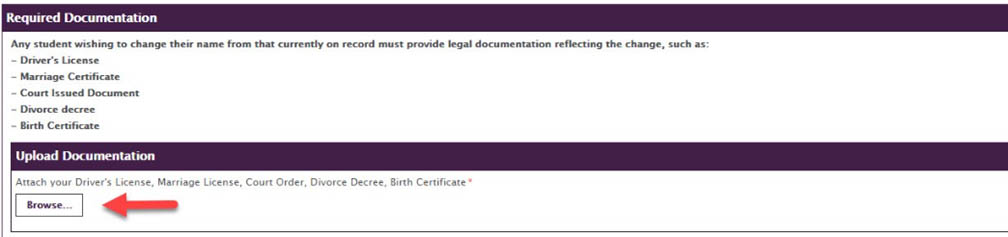
Fig 3. - Choose the document and click the “Open” button (Fig 4).

Fig 4. - Once the document has been successfully attached to the form, it will appear above
the Browse button (Fig 5). It can be removed if a different document is necessary
and multiple documents can be added by repeating steps 4 and 5 until all documents
have been added.

Fig 5. - Click in the middle of the rectangle, and a signing box will appear (Fig 6).
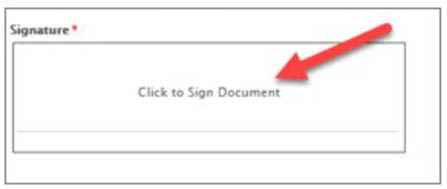
Fig 6. - Using your mouse, sign the document and click the “Apply Signature” button (Fig 7).
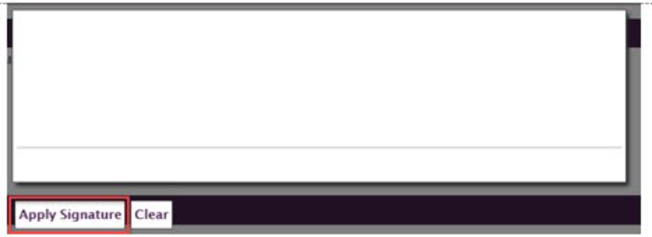
Fig 7. - To submit the completed form, click on the “Submit” button (Fig 8).

Fig 8. - Once the form has been submitted, a confirmation email will be sent from the Registrar's
Office (Fig 9).

Fig 9.
For support, please submit an AES Support Portal ticket.