

Petition for Exception to University Policy (Graduate Students)
Purpose: Graduate students understand that it is their responsibility to adhere to all published deadlines and policies, however, the university recognizes that sometimes life events throw stumbling blocks in our path. WCU is sensitive to students who find themselves facing urgent matters beyond their control. You can review those policies in the Graduate Catalog.
A Petition for Exception to University Policy may be utilized when a student needs to:
- Add a class after the add period has ended
- Withdraw from a course or an entire semester after the deadline
- Seek additional readmission after dismissal
- Seek an extension to an NG or IP grade
- Seek a tuition adjustment for a withdrawn semester after the published refund deadline
- Seek other exceptions to policy.
Note: Graduate students seeking multiple exceptions (ex. late add and a late course withdrawal) must use a separate petition form for each action.
NAVIGATION
- Log into RamPortal.
- Locate the Student Forms card. (Fig 1)
- You will find the Petition for Exception to Policy – Graduate Students link on this card.
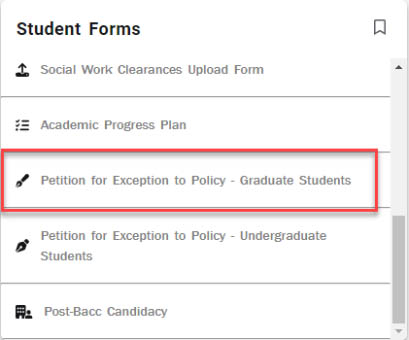
Fig 1 - Click on that link to open the Petition for Exception to Policy.
COMPLETE THE PETITION
- You will notice your ID, First Name, Last Name, and Email address pre-populate (Fig
2).
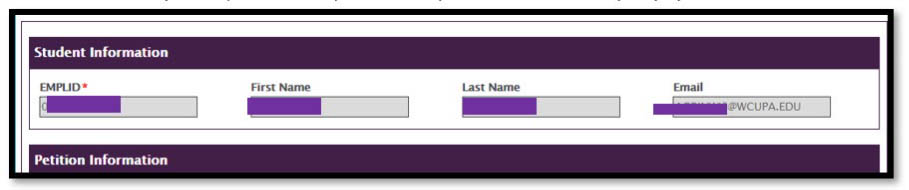
Fig 2 - Please select the type of exception you are seeking (Fig 3). Note: If you are seeking to withdraw from a course, you will select Late Course Withdrawal.
If the one course you wish to withdraw is the only course you're taking that semester,
it is considered a Term Withdrawal.
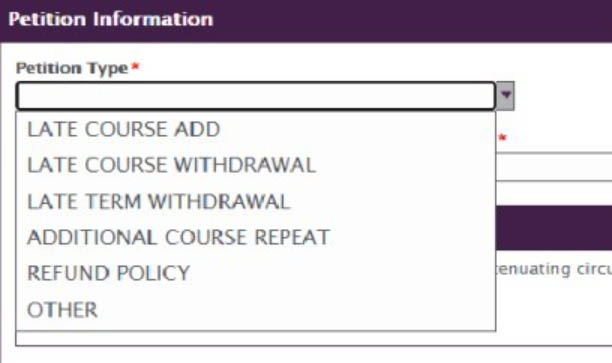
Fig 3 - Once you select your petition type, you will need to provide details.
- If you select Late Course Add, Late Course Withdrawal, or Additional Course Repeat;
you will need to provide the Course Subject, Course Number, Section Number, Faculty
Email Address (in the traditional first initial + last name + @wcupa.edu format),
Term (ex. Fall, Spring), and the Year. Be sure to type in the correct faculty email
address, so the review process is not held up due to misdirected paperwork. Faculty
contact information can be found on the WCU website. The Faculty Email is used for routing the form, so only enter one email accurately
or it will not be processed.

Fig 4 - Once you've selected the Petition Type, you will need to upload any Supporting Documentation you have that provides proof of your extenuating circumstances (Fig 6). This documentation
may include things such as medical paperwork, a note from a medical provider, an eviction
notice, an accident report, or even an email exchange with an academic advisor or
department chair. Note: Only jpeg/jpg, tff/tiff, and PDF files can be accepted. You will be unable to upload
images taken with a mobile device that are not converted to one of those formats.
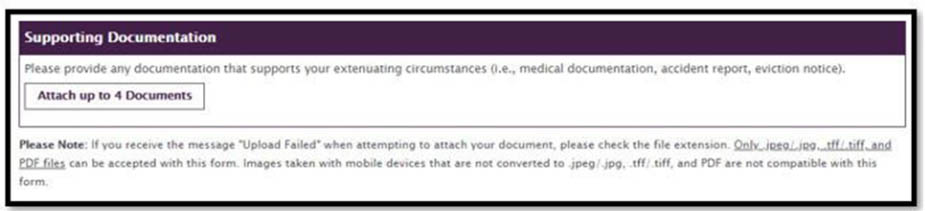
Fig 6 - Next, provide an explanation for your request (Fig 7). This field is extremely important. Give details that clarify
the extenuating circumstances surrounding the missed deadline or need for policy exception.
For example: Don't just say you missed a deadline because of illness. Instead, explain when you
started to feel ill, when you met with a medical professional, and if they felt you
needed to rest for a certain number of days, provide that information, as well. If
you reach out to a faculty member or advisor to discuss the matter, provide that information,
too. This is where you help us to fully understand your situation.
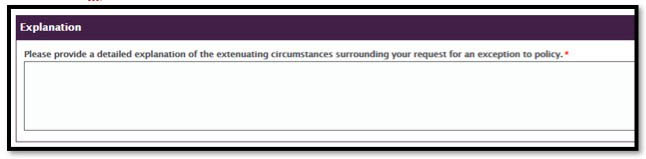
Fig 7 - Next, you'll be asked to connect with the Financial Aid Office (if you have financial
aid) and make sure that your request for an exception does not impact your aid. Often,
students who seek an adjustment of tuition and fees find that they are then required
to repay their awarded financial aid. Check the box to indicate that you have connected
with the Financial Aid Office (Fig 8).

Fig 8 - Those are all the fields you need to complete. Next, click the Submit button at the bottom of the form to submit your petition for review (Fig 9).

Fig 9
Note: Submitting a petition form does not send it directly to The Graduate School. Your request will first be sent to your Graduate Coordinator and Department Chair for review and approval before it makes its way to The Graduate School.
For support, please submit an AES Support Portal ticket.