
Program Changes: Add, Change, or Remove a Major, Minor, or Certificate
Last edit date: 9/26/2025
Purpose: Students can request to add, change, or remove a major, minor, certificate, or sub-baccalaureate program through the Student Forms card in RamPortal. Requests are submitted online and routed to the appropriate office for review and approval.
| Contents |
|---|
| Navigation |
| Select Your Change and Request Type |
| Add A Program |
| Change A Program |
| Remove A Program |
| Confirmation |
NAVIGATION
- Login to RamPortal using your WCU Single Sign On (SSO).
- Locate the Student Forms card on your home page (Fig. 1). For help with finding cards, visit Home Page Navigation: A Guide to the RamPortal Home Page.
- Select Change/Add/Update Plan Request.
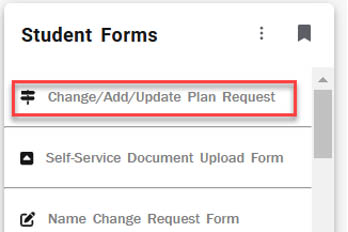
Fig. 1
SELECT YOUR CHANGE AND REQUEST TYPE
- Once the form loads, select the Change Type for the program you want to update: Certificate, Major, Minor, or Sub-Baccalaureate (Fig. 2).
- Then choose the Request Type (Fig. 2):
- Add: Keep your current program(s) and add another.
- Change: Replace an existing program with a new one.
- Remove: Use this if you want to remove an additional program (like a second major, minor,
or certificate). You cannot remove your only major or certificate.
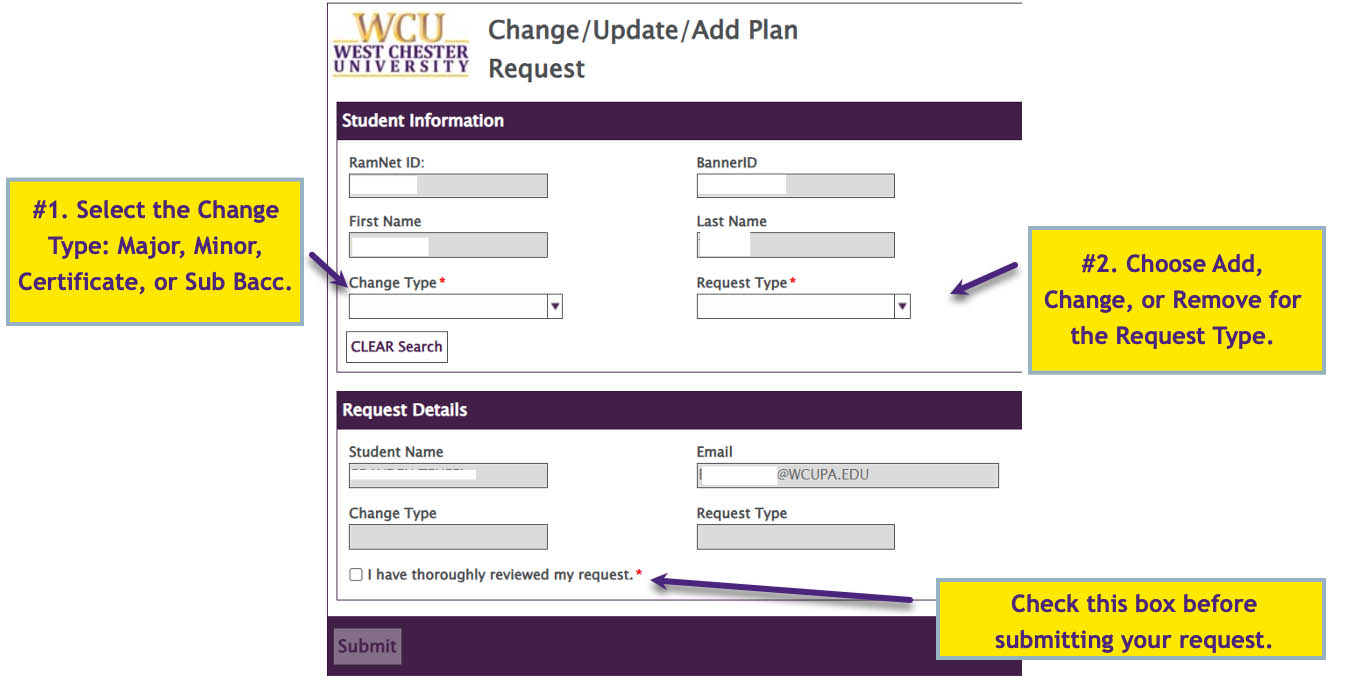
Fig. 2
ADD A PROGRAM
Add a Major and/or Concentration
- Choose Change Type: Major and Request Type: Add (Fig. 2).
- A Department dropdown will appear. Select your Department (Fig. 3).
- Tip: You can start typing in the box to quickly search for your Department.
- After you select your Department, click the Program Lookup button that will appear just below to view available Majors (Fig. 3).
- To search for a different program, click the Clear Program button before choosing a different Department.
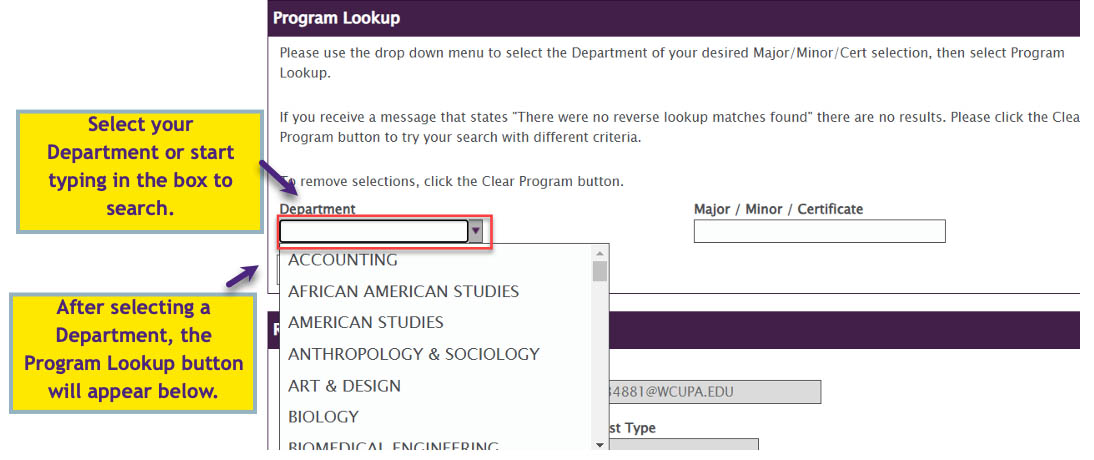
Fig. 3: Example of Program Lookup Section
- To search for a different program, click the Clear Program button before choosing a different Department.
- Choose your Program from the list (Fig. 4). Check the Major/Minor/Certificate column to confirm the correct program and click Select.
- Use the Concentration Description column to check if the Program offers concentrations. Select the row with a concentration
if you want to declare one or the row without if you do not (Fig. 4).
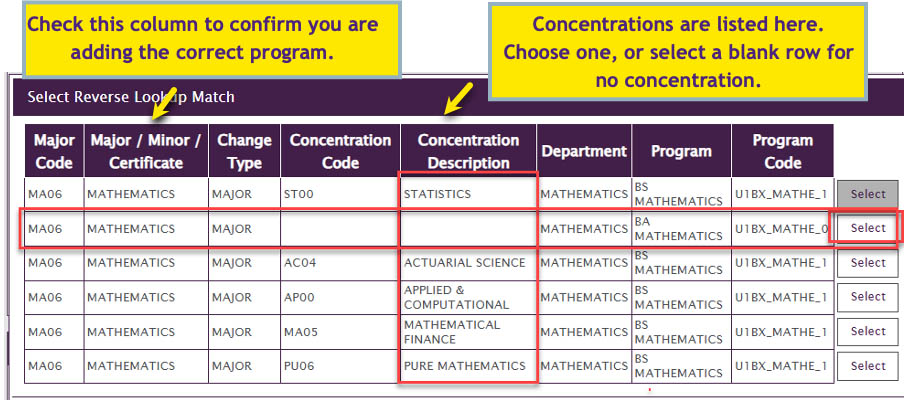
Fig. 4: List of programs with concentration options
- Use the Concentration Description column to check if the Program offers concentrations. Select the row with a concentration
if you want to declare one or the row without if you do not (Fig. 4).
- Review the Request Details. If you selected a concentration, confirm that the correct option is shown in the Concentration Description field. Then check the I have thoroughly reviewed my request button (Fig. 2) and click Submit.
Add a Minor, Certificate, or Sub-Baccalaureate
- Choose Change Type: Minor, Certificate, or Sub-Bac (Fig. 2).
- Set the Request Type: Add (Fig. 2).
- Follow steps 2-5 in Add a Major and/or a Concentration above to select your Department, use the Program Lookup, and choose your program.
- Note: If you get the following error, it means no program of that type is available in the selected Department. Click OK and make another selection.
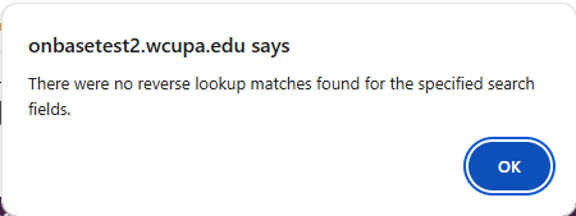
Fig. 5
CHANGE A PROGRAM
- Choose the desired Change Type and Request Type: Change (Fig. 6).
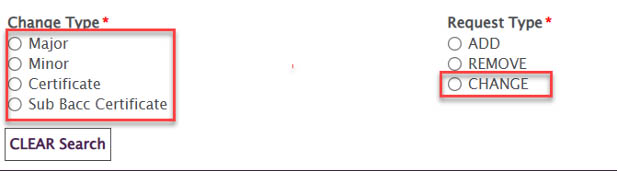
Fig. 6 - In the Current Program box, click Available Programs to view your existing program(s). Select the one you want to change (Fig. 7).
- In the Program Lookup section, select the Department for your new Program (Fig. 7).
- Tip: You can start typing in the box to quickly search your Department.
- Click the Program Lookup button to view available programs.
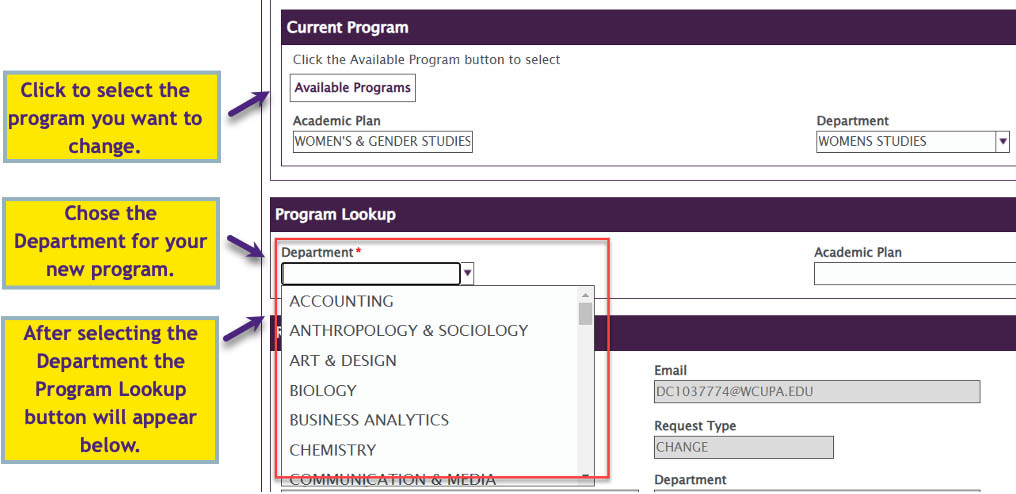
Fig. 7 - Select your new program from the list (Fig. 8). If concentrations are available, they
will be listed in the Concentration Description column.
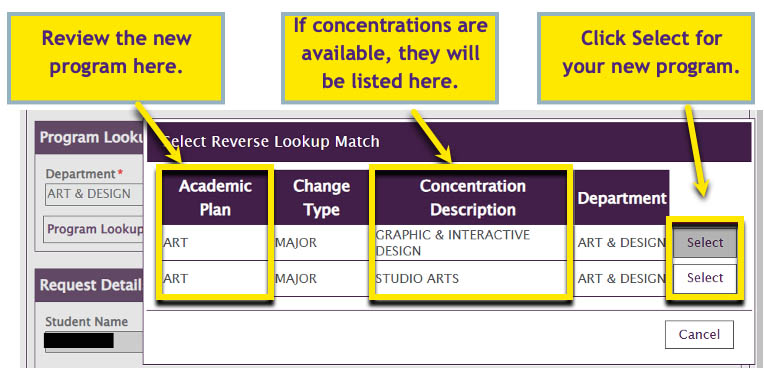
Fig. 8 - Review the Request Details. Confirm your new program is correct, then check the I have thoroughly reviewed my request box and click Submit.
REMOVE A PROGRAM
- Choose the appropriate Change Type: Major, Minor, Certificate, or Sub-Bacc.
- Set the Request Type (Fig. 2) to Remove.
- In the Current Program box, click the Available Programs button. Your current programs will display. Select the program you want to remove.
- Note: You cannot remove your only major or your only certificate. You may only remove an additional program, such as a second major, minor, or certificate.
- Review the Request Details. Confirm the correct program is listed, then check the I have thoroughly reviewed my request box and click Submit.
CONFIRMATION
- After you submit your request, a confirmation message will appear on the screen.
- You will also receive an email with the details of your request and a link to review or cancel it if needed.
For support, please submit an AES Support Portal ticket.