

Academic Progress Pre-Plan Survey via RamPortal
Last edit date:
Purpose: Undergraduate students on any type of academic probation or warning are requested to fill out the Academic Progress Pre-Plan Survey via their RamPortal account. This will connect the student with their advisor to create a plan for academic success.
| Contents |
|---|
| Navigation |
| Submit Survey |
NAVIGATION
- Log into RamPortal
- Locate the Student Forms card (Fig 1).
- You will find the Academic Progress Plan link.
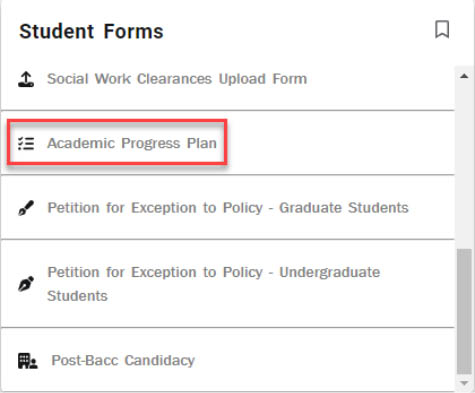
Fig 1
SUBMIT SURVEY
- Your ID, First Name, Last Name, and Email address will pre-populate (Fig 2).

Fig 2 - Select whether you are a student athlete and/or engaged in military service (Fig 3).
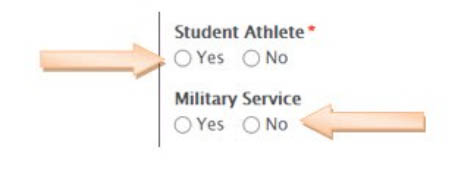
Fig 3 - Select any Challenges that Impacted Success; you can indicate as many as you would like from the following areas (Fig 4).
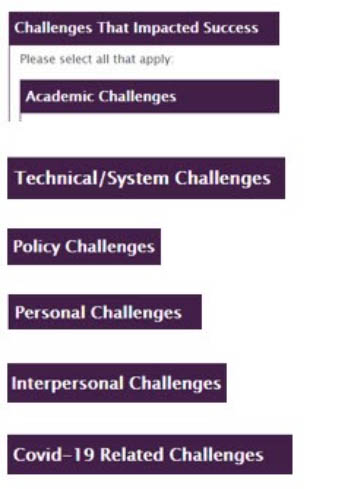
Fig 4 - Select the Other check box to add any additional challenge you may have faced that was not covered
on the form (Fig5).
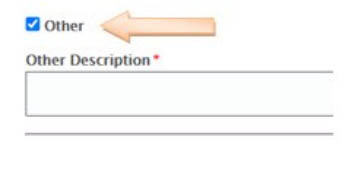
Fig 5 - Select the Submit button.
For support, please submit an AES Support Portal ticket.