

Undergraduate Students taking Graduate Courses for Undergraduate Credit
Audience: Audience: Undergraduate Students wanting to take Graduate Courses for Undergraduate Credits
Purpose: This document provides step-by-step instructions for Undergraduate Students applying for Graduate Courses for Undergraduate Credits in RamPortal.
| Contents |
|---|
| Accessing the Form |
| Filling Out the Application |
ACCESSING THE FORM
- Log in to RamPortal.
- Navigate to the Student Forms Card and find the link for the Undergraduate Student Taking Graduate Course (Fig 1).
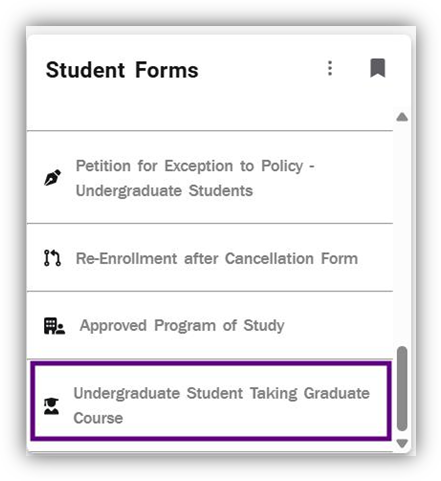
Fig 1 - Your RamNet ID, first name, middle name, and last name should be automatically pre-populated. If not, please close the form and try again.
FILLING OUT THE APPLICATION
- Select the Course Subject from the provided dropdown menu, enter the Course Number, Course Section, Faculty Email address, Term, Term Year, and Reason for Request in the Course Information Section. Thoroughly review the information, then select the checkbox to verify that has been completed. Today's date and the Submit button will appear once the form has been completed (Fig 2).
- Click Submit to send the form to review (Fig 2).
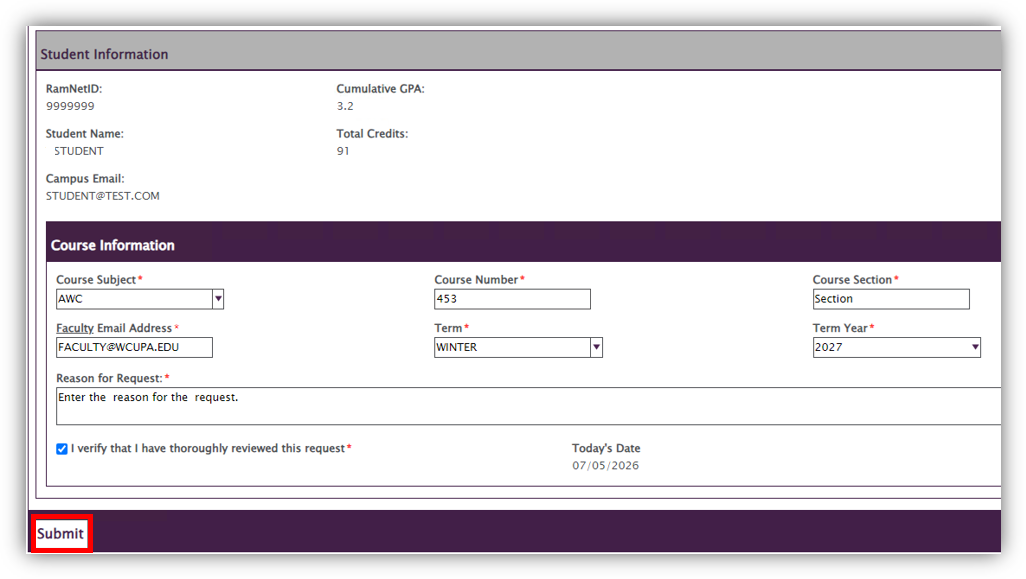
Fig 2 - A notification will be sent to your campus email address once submitted.
- After submission, the form will be reviewed by an advisor, Faculty of Course, Chair, Dean, The Graduate School, and the Registrar's Office. You will receive a notification of the results of the review.
For additional assistance, submit an AES ticket for support.